


Beeline
4.6187.00 Reviews
App Specs
- Version
- 4.2.8191
- Updated On
- License
- Free
- Downloads
- 100,000+
- Developer
- Relish Technologies Ltd.
- Categories
- Maps & Navigation
- Platform
- Android
Screenshots
 Analysis by AppCompare
For a ride, the useful route is not always the shortest one. I want to know whether I can get there without spending the whole trip beside fast traffic, and whether the directions will still make sense once I’m moving. That is the problem Beeline is meant to solve. It is a free navigation app for cycling and motorcycling from Relish Technologies Ltd., and I find its appeal is strongest when choosing a ride matters as much as reaching the destination.
Begin with the kind of ride you want
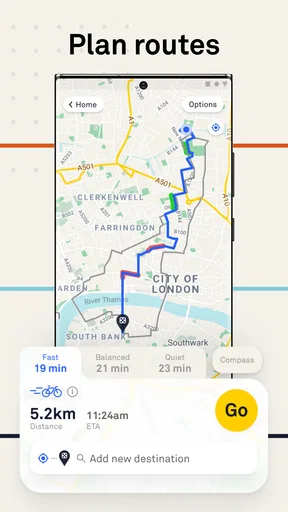
The first decision is not simply where to go, but what sort of journey suits the moment. A rushed trip across town calls for a different route from an easy weekend ride, and Beeline’s route choices let you steer that decision toward speed, balance, or quieter roads. I like having that choice because a default route can be technically direct yet unpleasant to ride.
For a practical commute, I would start with the balanced option and check the proposed route before setting off. If I have spare time, I can lean toward quieter streets and accept a less direct journey. That small change in priorities is more useful than treating every trip as a race against the clock. Riders should still use their own judgement: a route preference is a planning aid, not a guarantee that every street will feel comfortable or suitable.
Plan first, then let the ride take over
When you open the app, you're greeted with an intuitive interface that’s refreshingly easy to use. Let’s dig into some of the features that caught my eye:
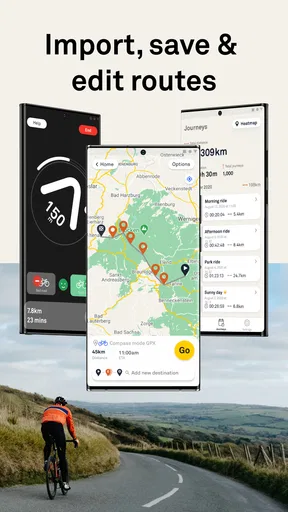
- Route customization: You can choose between fast, balanced, and quiet routes. The app even lets you adjust the balance between these options, so if you’re in the mood for a peaceful ride, Beeline has got you covered.
- Offline maps: Perfect for those moments when you’re out of data or in an area with spotty reception. Download the map ahead of time and ride without worries.
- Live traffic updates: Stay informed with real-time traffic updates. This feature ensures you’re always on the best path.
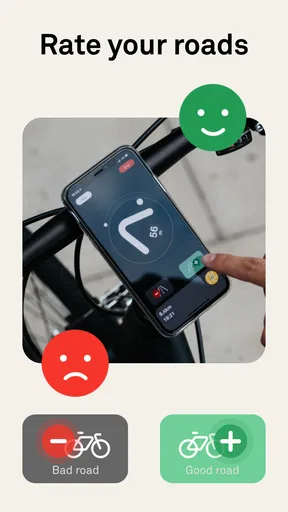
- Community insights: Fellow riders can leave tips and notes on routes. It’s like having a local guide at your fingertips!
A useful habit is to decide your route style before leaving, rather than changing it while negotiating traffic. On an unfamiliar trip, I would review the planned line while stationary, then use the map download option before entering an area where reception may be unreliable. Offline preparation is especially helpful for a ride that crosses patchy coverage, but it still depends on doing the preparation in advance; it is not a substitute for checking that the route is sensible before you set off.
Keep the phone and the road in the right roles
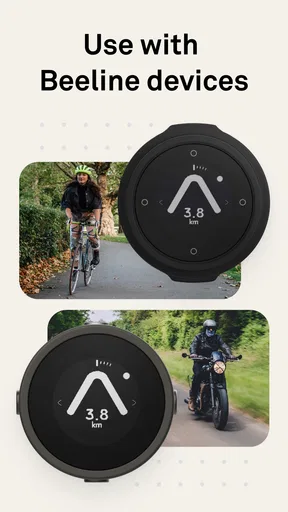
Using Beeline feels like having a personal cycling coach. The interface is sleek and user-friendly, making it a breeze to plan your next adventure. The app syncs seamlessly with various smart devices, so whether you’re on your phone or smartwatch, your route is just a tap away.
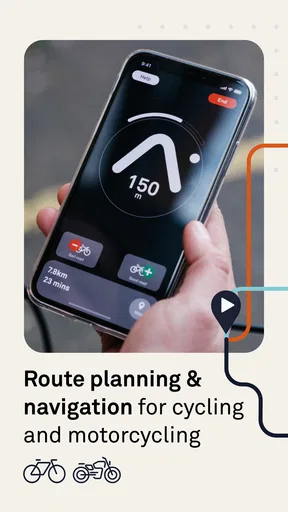
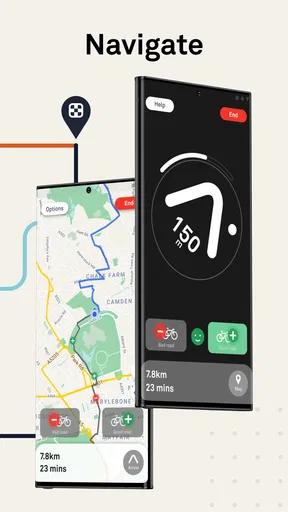
The navigation system is precise, providing clear directions and timely alerts. I appreciate the gentle vibration alert that reminds me of upcoming turns without being overly intrusive. It’s perfect for staying focused on the road ahead.
Worth Reading Before You Choose

EA SPORTS FC Mobile 26 Is a Bigger Football Game, but It Takes Time

Flipboard Shows What News Apps Must Do Beyond the Feed

Switching to Android Auto Means Rethinking Your Driving Routine

Google Calendar Makes a Crowded Week Easier to Manage

Ludo King Makes the Most of the Minutes Between Plans

Baby Panda World Brings Quick Play to Modern Phones, but Its Game Library Feels Busy
In practice, the handoff between planning and riding is where a navigation app either earns its place or becomes a distraction. I would set the destination and route preferences before mounting the phone, then rely on the turn cues rather than repeatedly checking the screen. Vibration can be useful when road noise makes spoken guidance hard to hear, but it should not encourage anyone to ride without looking where they are going. If a turn is confusing, stopping somewhere safe to check the map is the sensible move.
What a normal trip looks like
Imagine heading to a café in a part of town you do not know well. You enter the destination, compare the quicker line with a quieter alternative, and choose the one that suits your time and comfort. Before leaving, you check the route and save the map if you expect reception to weaken. During the ride, turn alerts help you keep moving without staring at the phone. Once there, the route has done more than connect two points: it has helped you make an informed choice about how the trip should feel.
That workflow also shows where community notes can help. A rider’s tip may give useful context about a stretch of road, especially when you are exploring somewhere unfamiliar. I would treat those notes as local clues rather than definitive instructions: conditions change, and another rider’s comfort level may not match yours. The best use is to combine them with your own route check, not to hand over the whole decision.
How it compares, and where it can fall short
I find the key comparison is not whether Beeline can replace every map, but whether ride-focused route choices improve the trips you actually take. Its value will depend on your streets, comfort level, and willingness to check a route before setting off; I would test it on a familiar journey first, then decide whether that extra planning step earns a place in your routine.
Built around riding rather than general travel
What makes Beeline stand out from other navigation apps is its focus on the riding experience. It’s not just about getting from point A to B; it’s about enjoying the journey. The emphasis on safe and scenic routes is a game-changer for anyone who loves cycling.
Compared with a general-purpose maps app, the attraction here is the chance to shape a route around the ride instead of accepting the most obvious route for all kinds of travel. That matters for cyclists who want quieter streets or a more enjoyable way across town. A standard map may be the better choice when your priority is broad, familiar navigation for walking, driving, and public transport in one place. Beeline makes more sense when cycling or motorcycling is the main reason you are opening a navigation app.
It is also worth distinguishing route preference from route certainty. A quiet-road setting can help guide planning, but I would not assume it can judge every crossing, surface, or moment of traffic exactly as a rider experiences it. If I know a route includes a difficult junction, I would inspect that section before departing and be ready to choose a safer alternative on the ground.
Who gets the most from it
Plus, the ability to connect with a community of riders adds a social element that’s both fun and informative. Sharing tips and discovering new paths through community insights has made my rides more enjoyable.
I would recommend trying it if you cycle regularly, commute through streets where route choice affects comfort, or enjoy exploring without planning every turn from scratch. It can also suit motorcyclists looking for ride planning and navigation rather than a tool limited to ordinary car journeys. Riders who already know their preferred streets may value the adjustable route approach less, but could still find the navigation useful when visiting a new area.
On the other hand, it is not the right fit for someone who wants a single app for every mode of transport or who expects navigation to remove the need for attention and local judgement. If you are heading into a remote area, relying on any phone-based route without preparation is a poor plan. Downloading a map ahead of time helps with connectivity, but I would still plan conservatively and avoid treating an app as a replacement for basic ride preparation.
Small trade-offs that matter over time
While Beeline offers a fantastic experience, there are a couple of things to keep in mind. The app’s focus is primarily on urban areas, so if you’re in a rural location, the navigation options may be limited. Additionally, while the route customization is impressive, it might take a few rides to find the perfect settings that match your preferences.
That learning period is not a major obstacle, but it does mean the first suggested route may not reflect what you personally consider comfortable. After a few trips, notice which streets you were happy to use and whether you would have preferred a quieter or faster balance. That is more useful than changing settings randomly from one ride to the next, because it gives you a clearer sense of what the route choices are doing for your own journeys.
Another point worth mentioning is the battery usage. Like most navigation apps, Beeline can drain your phone's battery, so make sure to have a charger handy for longer rides.
For longer outings, battery planning is part of route planning. Starting with a well-charged phone and limiting unnecessary screen checks can help avoid an unpleasant surprise. If you use a smartwatch or another smart device, the handoff may make guidance easier to glance at, but the phone still needs enough power for the trip. I would not set out on a long ride assuming that navigation use has no effect on battery life.
Cost, availability, and a sensible trial
The app is free to download, with in-app purchases listed from $4.99 to $54.99 per item. I would begin with the free experience and decide whether the route-planning approach fits my regular rides before considering any purchase. The app is rated for Everyone, has a 4.4 average from around 12,000 ratings, and has been installed over 100,000 times. Those figures suggest it has found an audience, but they cannot tell you whether its route preferences match your streets, so a short, familiar test ride is a better way to judge that.
It was released on January 17, 2017, and the current version is 4.2.7134, with Android 8.0 as the minimum operating system. I would check compatibility before installing, especially on an older phone. The developer, Relish Technologies Ltd., positions it for cycling and motorcycling navigation, so it is worth judging it on those use cases rather than expecting the same breadth as a general maps service.
My recommendation after weighing the workflow
If you’re looking for a navigation app that goes beyond the basics, Beeline is worth a try. It’s designed with cyclists in mind, offering a blend of functionality and enjoyment that’s hard to beat. Whether you’re commuting to work or exploring new trails, Beeline ensures you’re always on the best route.
I would soften that last promise: no navigation app can guarantee the best route for every rider or every changing road condition. What Beeline does well is give you meaningful choices before a trip and useful guidance while you ride. Its strongest case is a familiar, repeatable workflow: choose the kind of ride, inspect the route, prepare for weak reception, then follow directions with attention still on the road.
So, why not give it a whirl? Download Beeline and experience urban cycling in a whole new way. Happy riding!
Pros
- User-friendly interface and easy navigation.
- Real-time tracking enhances planning.
- Multiple transit options available.
- Accurate and timely route updates.
- Customizable alerts for disruptions.
Cons
- Limited coverage in rural areas.
- Occasional app crashes reported.
- High battery usage during tracking.
- Requires data connection for updates.
- No offline maps available.
FAQs for Beeline
What is Beeline and what does it offer?
Beeline is a navigation and route planning app designed to make your journeys more efficient and enjoyable. It offers features such as real-time traffic updates, customizable routes, and detailed map views. The app is user-friendly and caters to various travel modes, including cycling and driving, making it versatile for different users.
Is Beeline free to use, or does it require a subscription?
Beeline offers both free and premium versions. The free version includes basic features such as standard map views and route planning. The premium version, available through a subscription, unlocks advanced features like live traffic updates, voice navigation, and offline maps. Users can choose based on their navigation needs and preferences.
How accurate is Beeline’s navigation and traffic data?
Beeline leverages real-time data and advanced mapping technology to provide highly accurate navigation and traffic updates. While no navigation app can guarantee 100% accuracy, Beeline is known for its reliability and precision, making it a trusted choice for users who need timely and accurate travel information.
Does Beeline work offline, and how can I access offline maps?
Yes, Beeline offers offline map functionality, which is especially useful when traveling in areas with limited internet access. To access offline maps, users need to download the desired map areas in advance through the app’s settings. This feature is available in the premium version, ensuring navigation without data interruptions.
What devices and operating systems are compatible with Beeline?
Beeline is compatible with both Android and iOS devices. It supports a wide range of smartphones and tablets, ensuring that users can access its features regardless of their device type. Regular updates ensure compatibility with the latest operating systems, providing a smooth and seamless user experience.


